# Tiling

*Estimated read time: 6 minutes*

High-resolution scenes with many small objects often benefit from tiling: you split the image into overlapping tiles, run detection per tile, then merge the results. Tiling typically improves small-object recall, but can introduce duplicates near tile borders or reduce large-object accuracy.

`degirum_tools` provides four ready-made strategies. **TileModel**, **LocalGlobalTileModel**, **BoxFusionTileModel**, and **BoxFusionLocalGlobalTileModel**.

Think of the four modes as incremental layers:

* TileModel is the baseline: only tile inference plus optional NMS. Small objects pop, but large ones can fracture or vanish at tile seams.
* LocalGlobalTileModel adds a *global pass*. After the tile run, any object whose area exceeds `large_object_threshold` is replaced with the global detection. It is an error-correction sweep that restores large objects without changing the grid.
* BoxFusionTileModel keeps tile-only inference, but cleans up seam artifacts by performing a 1-D IoU fusion inside an edge band (`edge_threshold`). Boxes that overlap across tile borders are merged instead of duplicated.
* BoxFusionLocalGlobalTileModel combines both upgrades: seam fusion *and* global rescue. Use it when you need the most faithful merged view—large and small targets, minimal duplicates.

{% tabs %}
{% tab title="Tile" %}

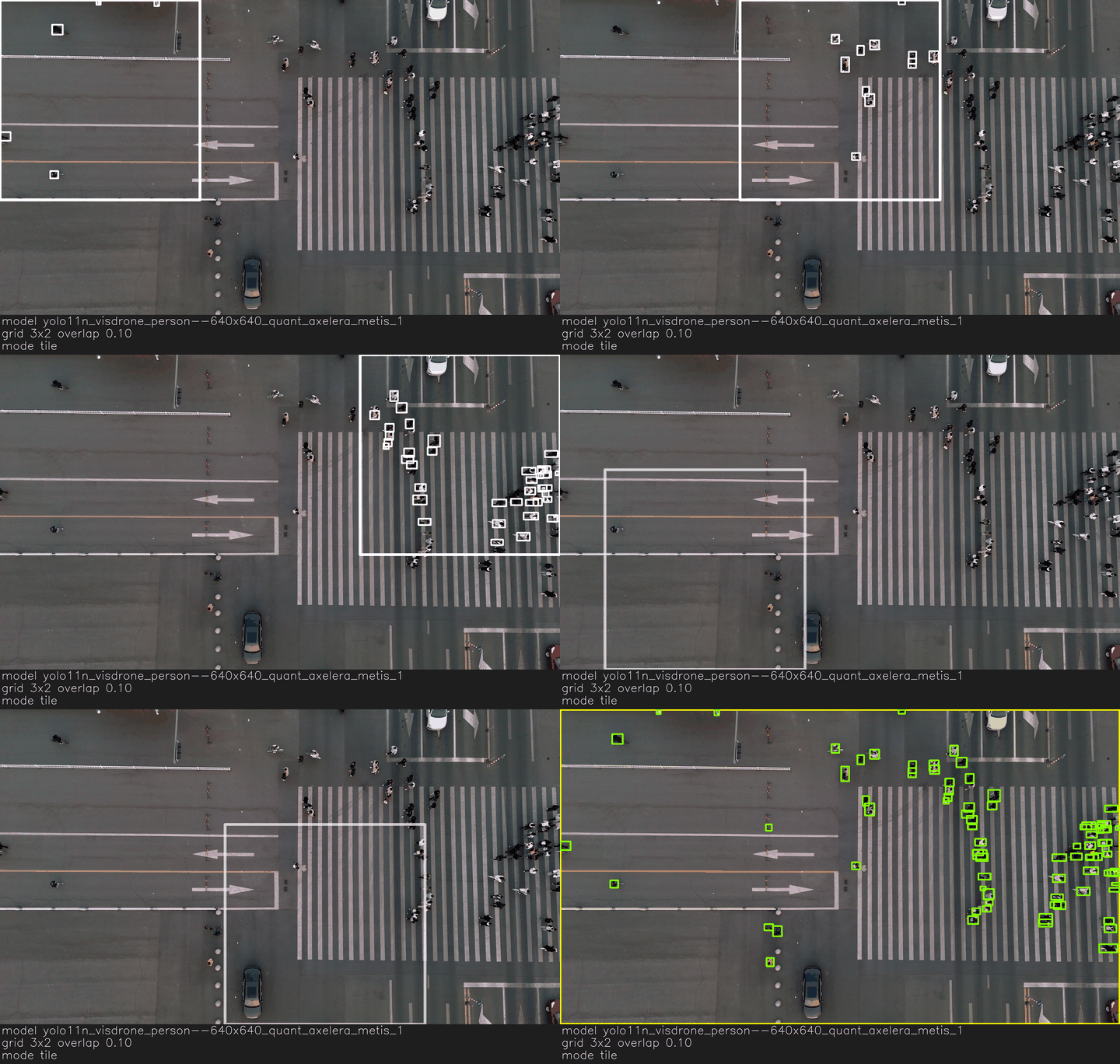
<figure><img src="https://387437463-files.gitbook.io/~/files/v0/b/gitbook-x-prod.appspot.com/o/spaces%2Fw4TFcrlOvSs7ZfsEpUnx%2Fuploads%2Fgit-blob-3d3afe01f50656de4b4a8ff3c58a1623627c313a%2Faxelera-cookbook--aerial_crossing_pedestrians_bikes--tilemodel-highlights-each-tile-and-overlays-merged-detections.gif?alt=media" alt="TileModel highlights each tile and overlays merged detections."><figcaption><p>TileModel highlights each tile and overlays merged detections.</p></figcaption></figure>

The white square shows the current tile being processed. The final yellow and green boxes are the detections produced by the tiling strategy.

The caption under the gif indicates the model, tile grid and overlap, mode, and runtime.
{% endtab %}

{% tab title="LocalGlobal" %}

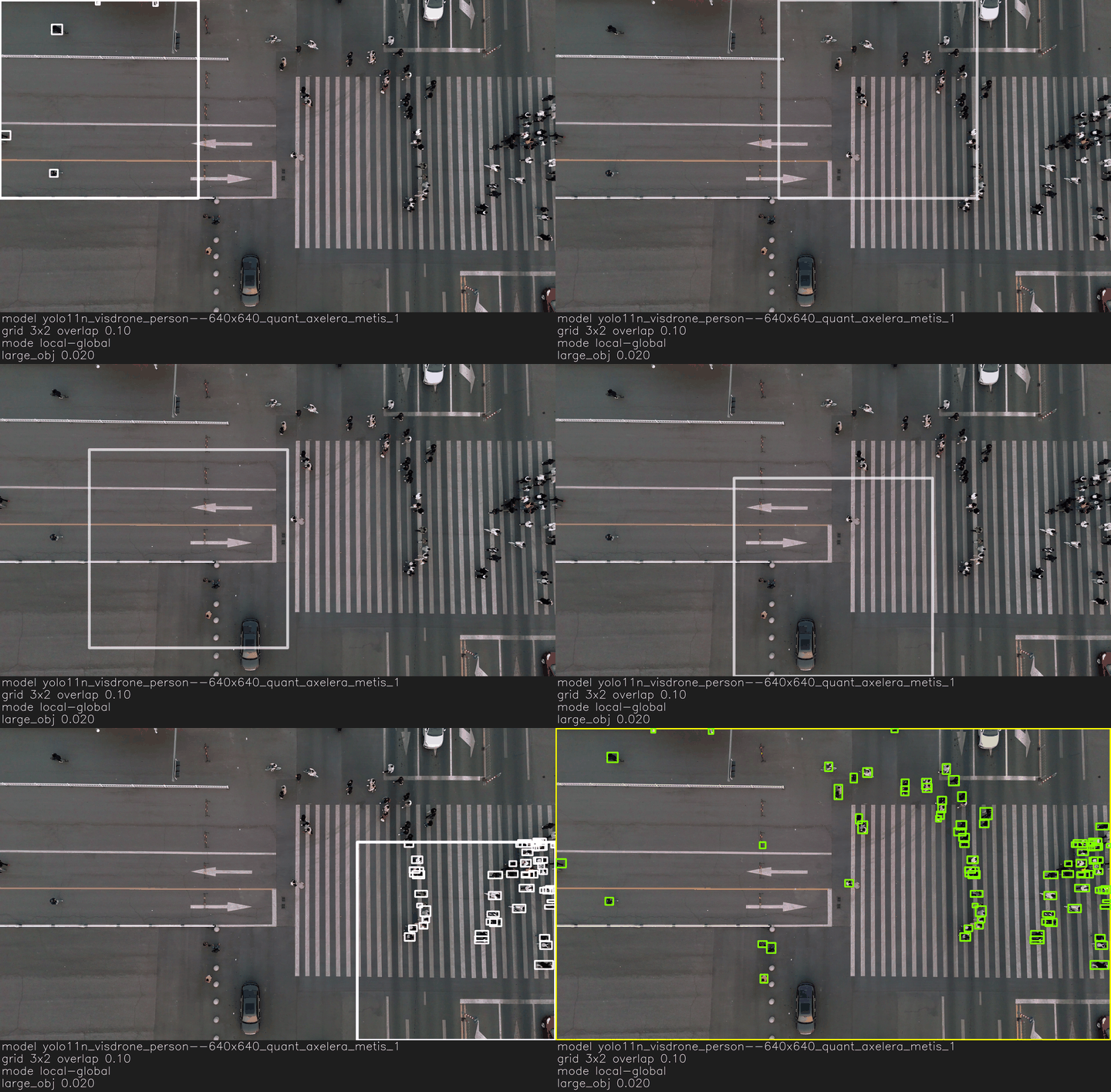
<figure><img src="https://387437463-files.gitbook.io/~/files/v0/b/gitbook-x-prod.appspot.com/o/spaces%2Fw4TFcrlOvSs7ZfsEpUnx%2Fuploads%2Fgit-blob-45a4c2bd45b876db888f84081fac8799dc972274%2Faxelera-cookbook--aerial_crossing_pedestrians_bikes--localglobaltilemodel-adds-a-full-frame-sweep-to-recover-large-objects.gif?alt=media" alt="LocalGlobalTileModel adds a full-frame sweep to recover large objects."><figcaption><p>LocalGlobalTileModel adds a full-frame sweep to recover large objects.</p></figcaption></figure>

Observe how there's an additional scan of the entire image. Compared to a plain old TileModel, LocalGlobalTileModel adds a final global scan and the `large_obj` threshold.

The caption again lists the model, grid/overlap, mode/runtime, and—new in this mode—the `large_obj` threshold that decides when to keep the global detection.
{% endtab %}

{% tab title="BoxFusion" %}

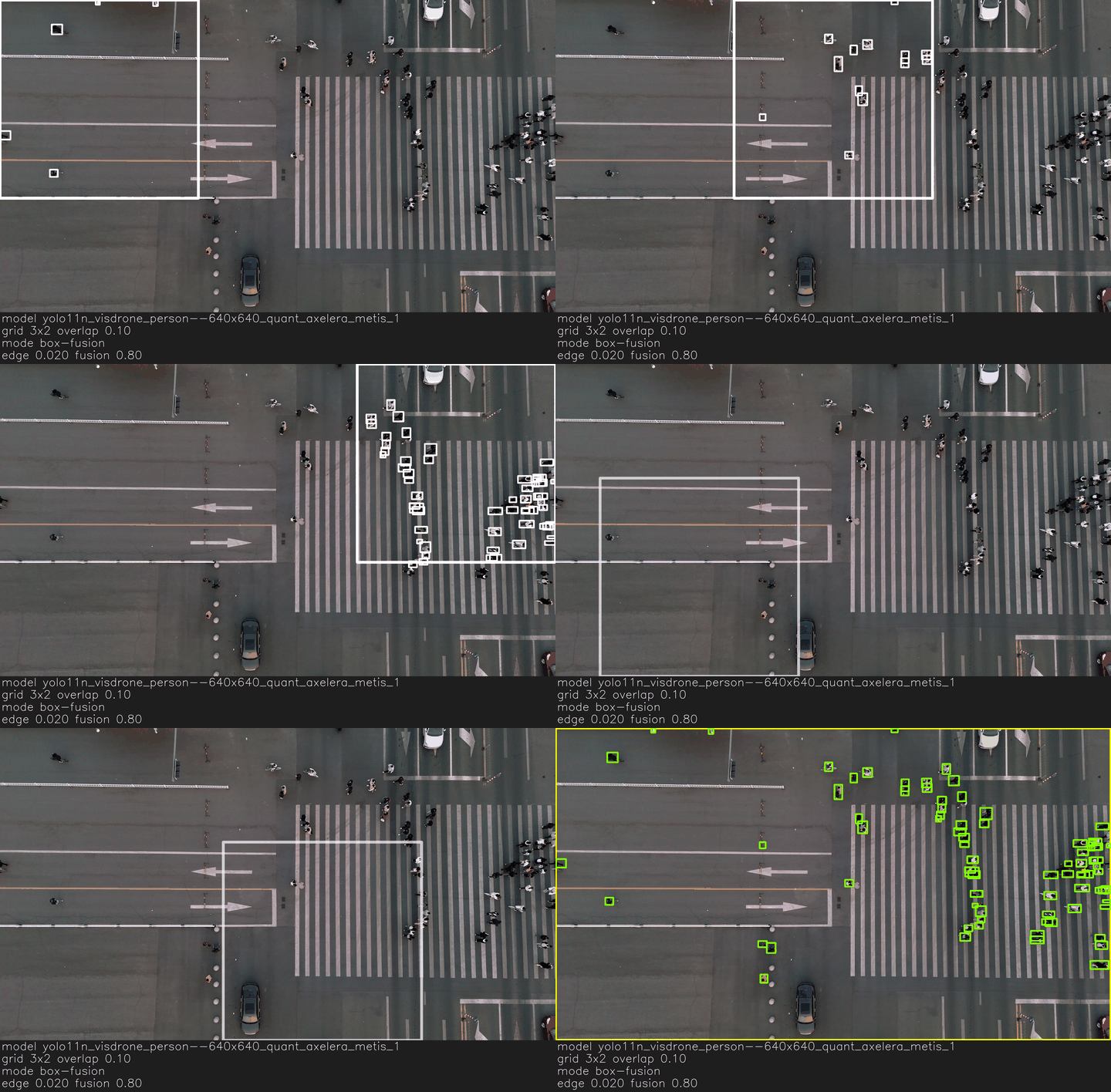
<figure><img src="https://387437463-files.gitbook.io/~/files/v0/b/gitbook-x-prod.appspot.com/o/spaces%2Fw4TFcrlOvSs7ZfsEpUnx%2Fuploads%2Fgit-blob-c3ff389110c876a26aa367b2e79ded1d4ab12a38%2Faxelera-cookbook--aerial_crossing_pedestrians_bikes--boxfusiontilemodel-fuses-overlapping-boxes-along-tile-edges.gif?alt=media" alt="BoxFusionTileModel fuses overlapping boxes along tile edges."><figcaption><p>BoxFusionTileModel fuses overlapping boxes along tile edges.</p></figcaption></figure>

Here the tiles behave the same as in TileModel, but seam duplicates disappear before the green boxes are drawn.

Unlike LocalGlobalTIleModel, there's no global scan with BoxFusionTileModel.

The caption still lists the model and grid, and now the third line includes the `edge` and `fusion` thresholds that control the seam-aware box merging.
{% endtab %}

{% tab title="BoxFusionLocalGlobal" %}

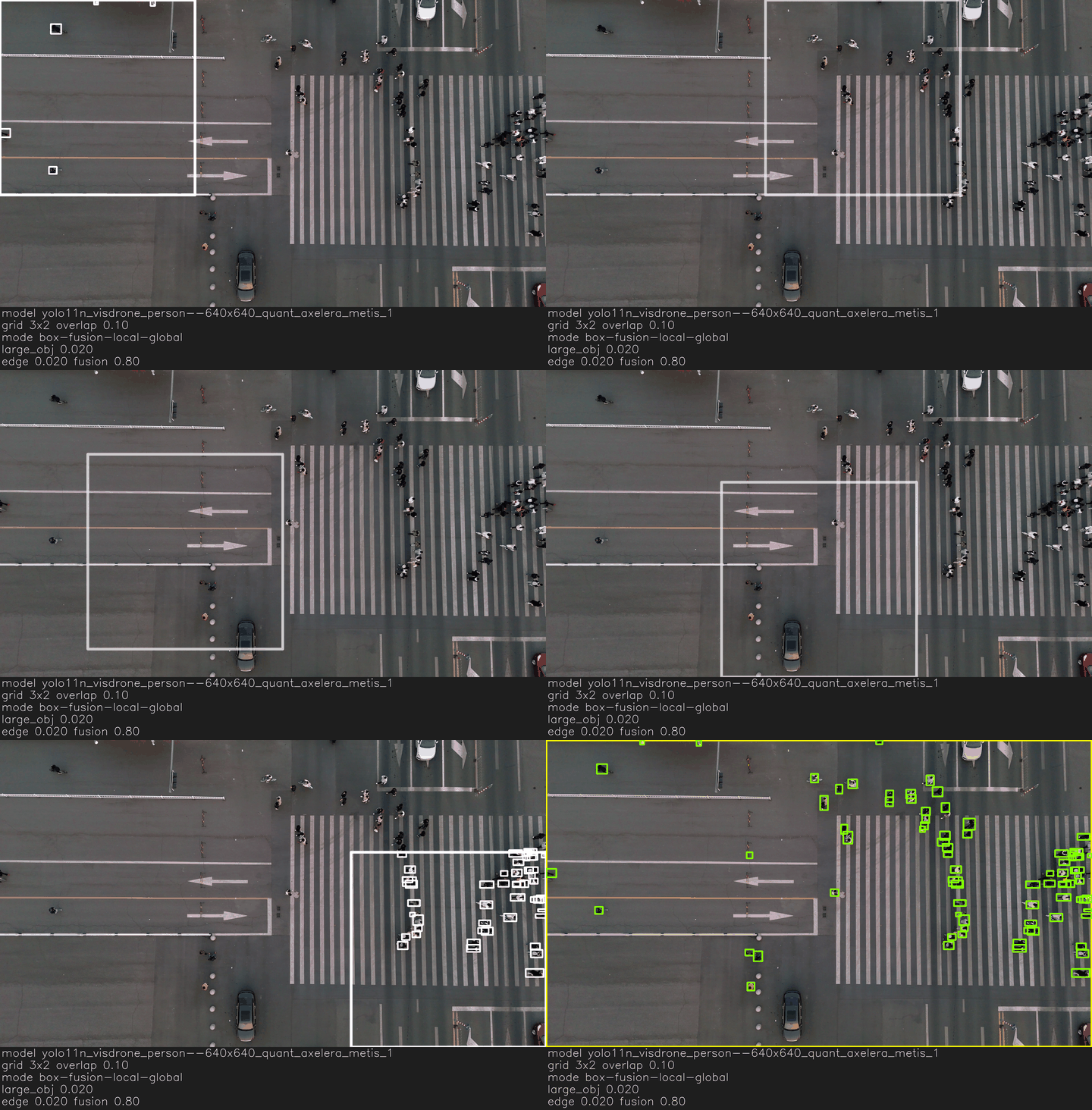
<figure><img src="https://387437463-files.gitbook.io/~/files/v0/b/gitbook-x-prod.appspot.com/o/spaces%2Fw4TFcrlOvSs7ZfsEpUnx%2Fuploads%2Fgit-blob-adbd99019df17fbeba0f70bbeb93fbb84ba7e8b2%2Faxelera-cookbook--aerial_crossing_pedestrians_bikes--boxfusionlocalglobaltilemodel-combines-seam-fusion-with-a-global-sweep.gif?alt=media" alt="BoxFusionLocalGlobalTileModel combines seam fusion with a global sweep."><figcaption><p>BoxFusionLocalGlobalTileModel combines seam fusion with a global sweep.</p></figcaption></figure>

This mode stacks improvements from LocalGlobal and BoxFusionTileModels.

The caption summarizes everything—model, grid, mode/runtime—and lists both `large_obj` and the box-fusion thresholds.
{% endtab %}
{% endtabs %}

Every command and JSON output in the demo includes these thresholds so you can tell at a glance which pipeline produced the result.

### Example (ModelSpec + remote\_assets)

{% code overflow="wrap" %}

```python
# --- Imports ---
from degirum_tools import (
    ModelSpec,
    Display,
    remote_assets,
    NmsBoxSelectionPolicy,
    NmsOptions,
)
from degirum_tools.tile_compound_models import (
    TileExtractorPseudoModel,
    TileModel,
    LocalGlobalTileModel,
    BoxFusionTileModel,
    BoxFusionLocalGlobalTileModel,
)
import degirum_tools

# (Optional) If you need OpenCV utilities elsewhere:
# import cv2

# --- Model (describe once with ModelSpec) ---
class_set = {"pedestrian", "people"}  # Keep only these labels in the output

spec = ModelSpec(
    model_name="yolo11n_visdrone_person--640x640_quant_axelera_metis_1",
    zoo_url="degirum/axelera",
    inference_host_address="@local",
    model_properties={
        "device_type": ["AXELERA/METIS"],
        "output_class_set": class_set,
        # Optional visualization tweaks:
        # "overlay_color": [(0, 255, 0)],
    },
)
base_model = spec.load_model()

# --- NMS base options used by some strategies ---
nms_options = NmsOptions(
    threshold=0.6,
    use_iou=True,
    box_select=NmsBoxSelectionPolicy.MOST_PROBABLE,
)

# --- Data sources (swap as needed) ---
image_source = remote_assets.drone_pedestrian
video_source = remote_assets.aerial_crossing_pedestrians_bikes

# --- (A) Baseline: No tiling ---
no_tile_result = base_model(image_source)
with Display("Baseline (no tiling)") as output_display:
    output_display.show_image(no_tile_result.image_overlay)

# --- Tiling grid (3 x 2 with 10% overlap) ---
cols, rows, overlap = 3, 2, 0.10


# Helper: build a tile extractor bound to the base model
def make_tile_extractor(global_tile: bool):
    return TileExtractorPseudoModel(
        cols=cols,
        rows=rows,
        overlap_percent=overlap,
        model2=base_model,  # Underlying detector
        global_tile=global_tile,  # Also run whole image if True
    )


# ========== Strategy 1: TileModel ==========
tile_extractor = make_tile_extractor(global_tile=False)
tile_model = TileModel(
    model1=tile_extractor, model2=base_model, nms_options=nms_options
)
tile_img_result = tile_model(image_source)
with Display("TileModel (image)") as output_display:
    output_display.show_image(tile_img_result.image_overlay)

# ========== Strategy 2: LocalGlobalTileModel ==========
tile_extractor = make_tile_extractor(global_tile=True)
local_global_model = LocalGlobalTileModel(
    model1=tile_extractor,
    model2=base_model,
    large_object_threshold=0.02,  # ↑ Pick from global if object area > 2% of image
    nms_options=nms_options,
)
lg_img_result = local_global_model(image_source)
with Display("LocalGlobalTileModel (image)") as output_display:
    output_display.show_image(lg_img_result.image_overlay)

# ========== Strategy 3: BoxFusionTileModel ==========
tile_extractor = make_tile_extractor(global_tile=False)
box_fusion_model = BoxFusionTileModel(
    model1=tile_extractor,
    model2=base_model,
    edge_threshold=0.02,  # How close boxes are to tile edge to consider fusing
    fusion_threshold=0.80,  # IoU threshold for fusing split boxes
)
bf_img_result = box_fusion_model(image_source)
with Display("BoxFusionTileModel (image)") as output_display:
    output_display.show_image(bf_img_result.image_overlay)

# ========== Strategy 4: BoxFusionLocalGlobalTileModel ==========
tile_extractor = make_tile_extractor(global_tile=True)
bf_lg_model = BoxFusionLocalGlobalTileModel(
    model1=tile_extractor,
    model2=base_model,
    large_object_threshold=0.02,
    edge_threshold=0.02,
    fusion_threshold=0.80,
    nms_options=nms_options,
)
bf_lg_img_result = bf_lg_model(image_source)
with Display("BoxFusionLocalGlobalTileModel (image)") as output_display:
    output_display.show_image(bf_lg_img_result.image_overlay)

# --- (B) Video example with tiling (choose any tile model above) ---
with Display("Tiled Video (TileModel)") as output_display:
    for res in degirum_tools.predict_stream(tile_model, video_source):
        output_display.show(res.image_overlay)
```

{% endcode %}

{% hint style="info" %}

* **When to tile**: Use tiling for crowded scenes, small targets, or very high-res inputs. Expect improved recall on small objects—but always check that large-object accuracy doesn't regress.
* **Grid & overlap**: Start with a `3×2` grid and `~10%` overlap. More tiles may improve recall but increase compute; too little overlap can cause border splits.
* **Local vs Global**: `large_object_threshold` controls when to trust whole-image detections (helps big objects).
* **Box fusion**: Use `edge_threshold` to mark boxes near tile edges, and `fusion_threshold` (IoU) to fuse duplicates across tile seams.
* **NMS policy**: Tune `nms_options` to your model and object density. `MOST_PROBABLE` is a good default.
* **Class filtering**: Use `output_class_set` (as shown) to focus on relevant classes for your application.
* **Video**: `predict_stream` handles capture and looping for files, RTSP, or webcams. You can use it with any of the tile models—they behave like standard models.
  {% endhint %}