# Input preprocessing

*Estimated read time: 6 minutes*

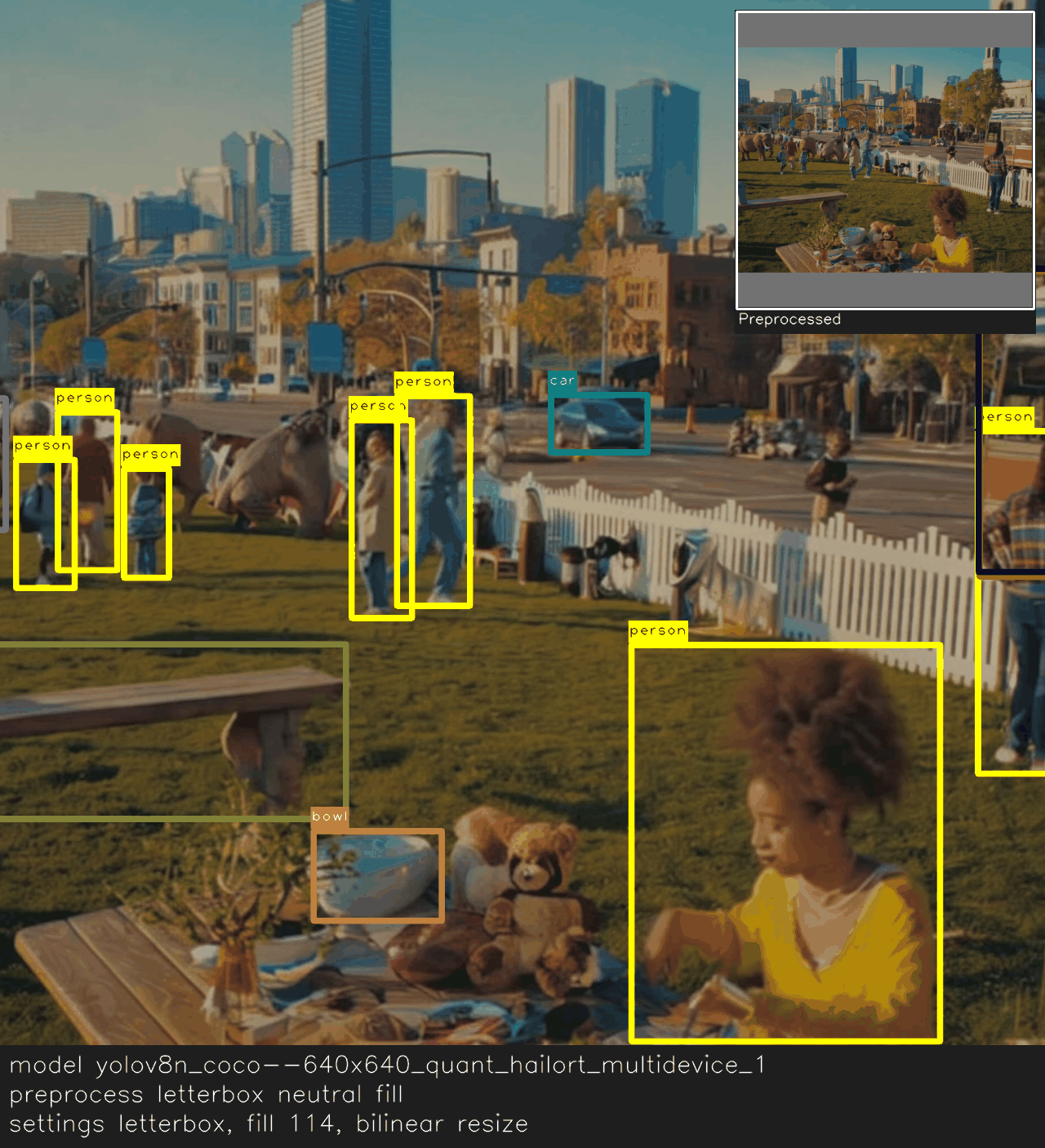
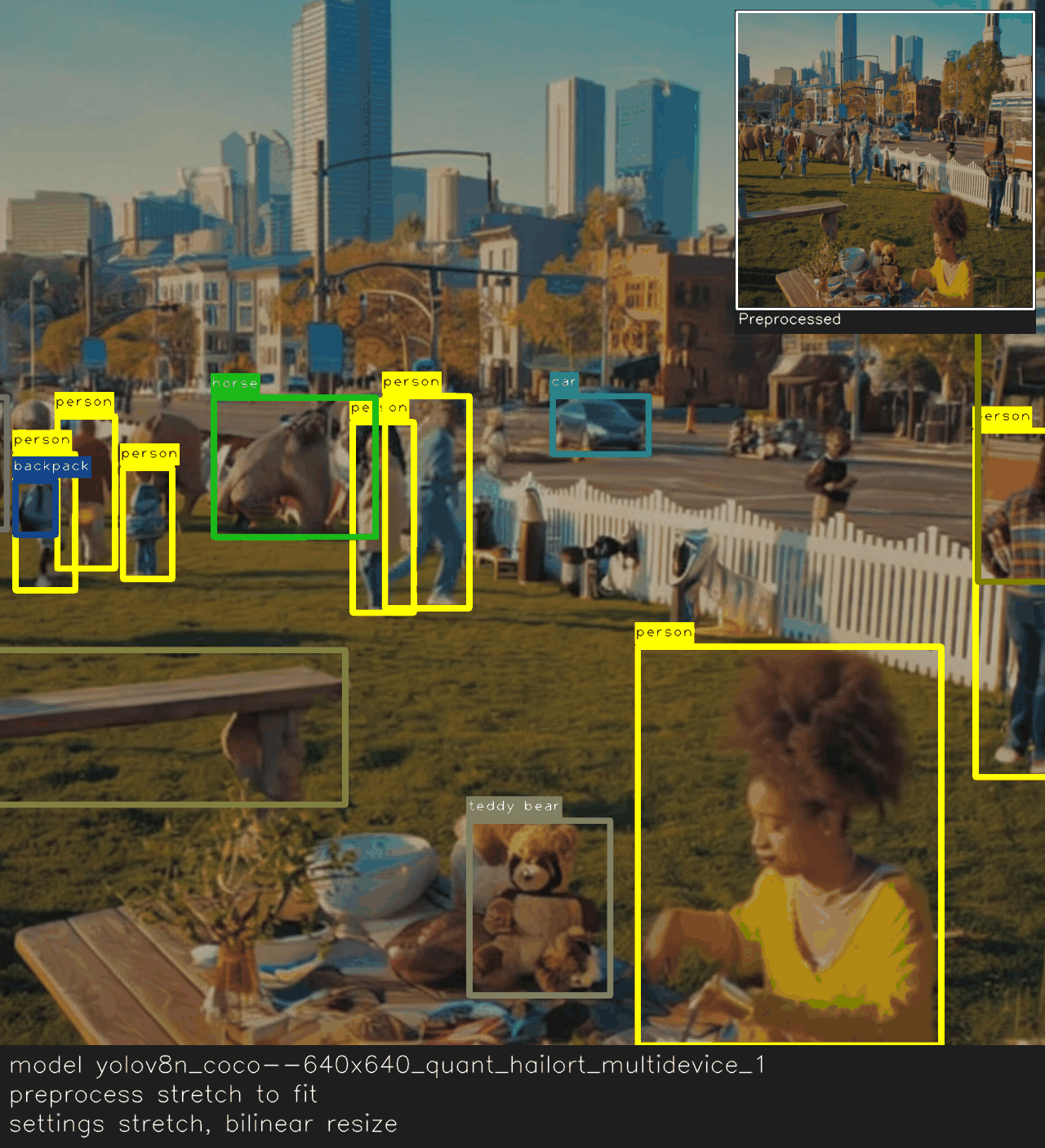
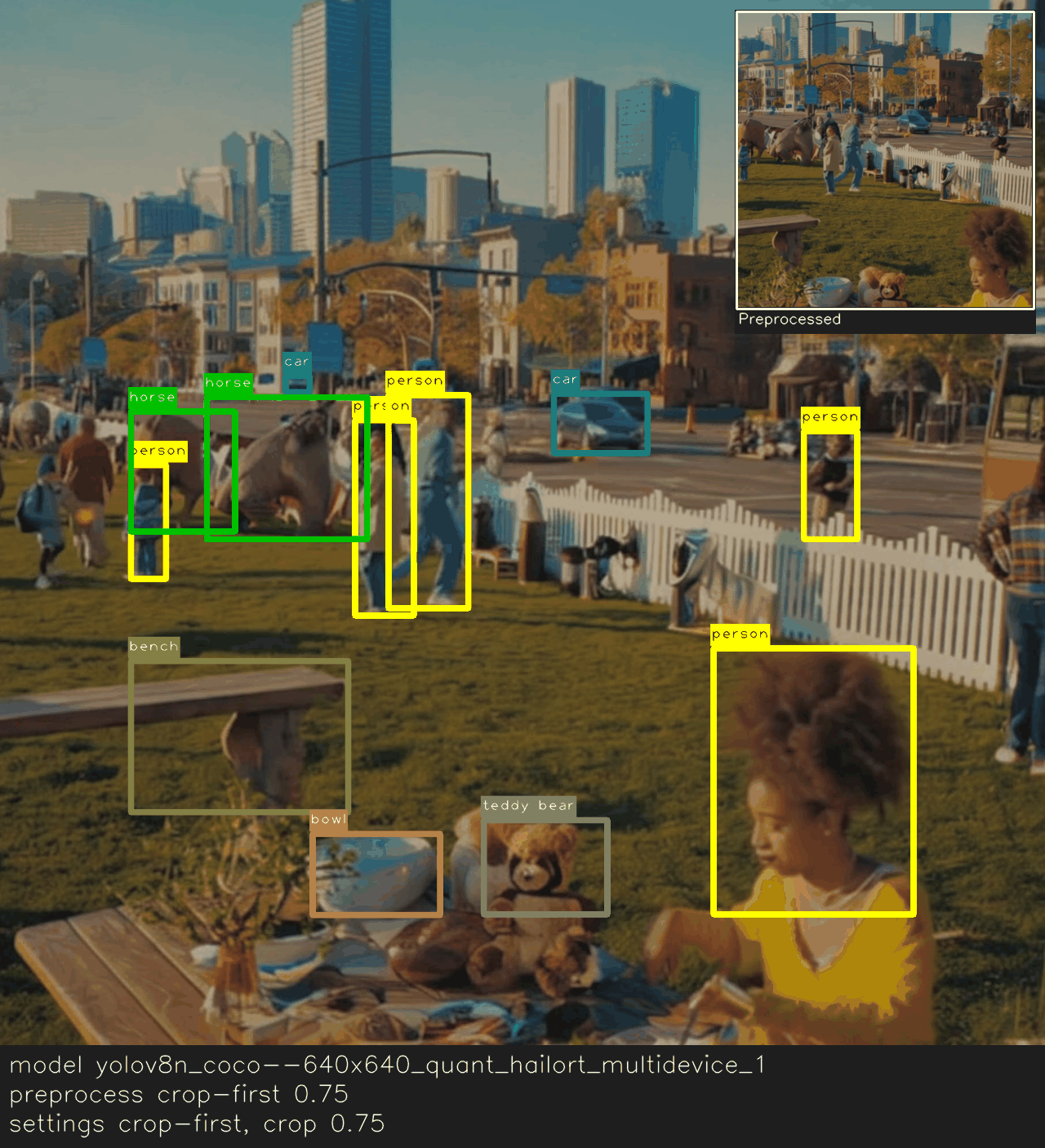
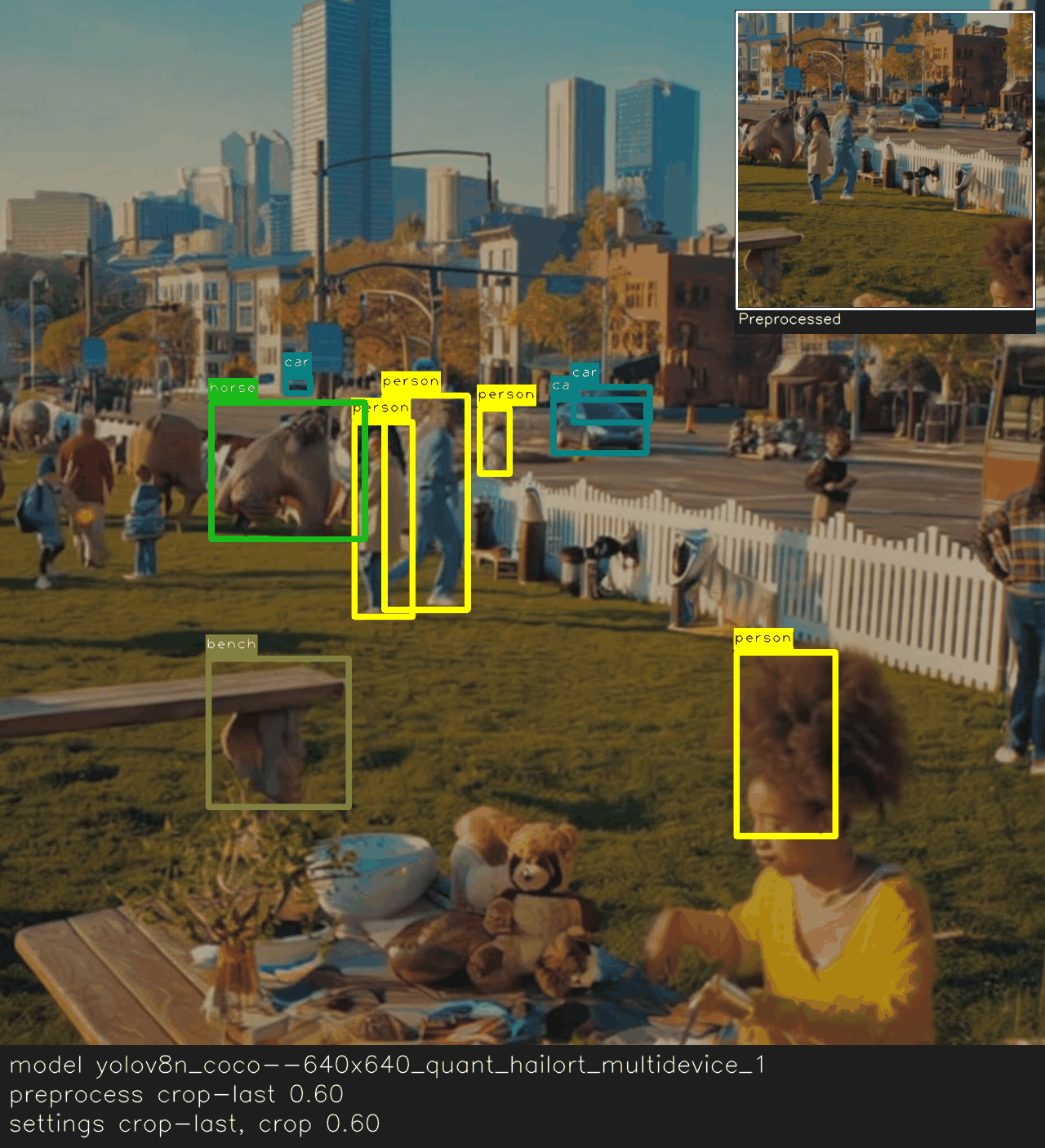
Most inputs (e.g., camera frames, videos, and screenshots) won’t match your model’s size or aspect ratio out of the box. Hailo models use a fixed input shape, so each frame needs a quick adjustment before entering the network. The key is to match preprocessing to how the model was trained: fit strategy (`letterbox`, `stretch`, `crop-first`, `crop-last`), interpolation method, crop percentage, padding color, and color handling.

Because these details aren’t always obvious, we've made them tunable at runtime. Try a few settings, see what performs best, then lock them in—no need to rebuild the model JSON file. In practice, you’ll pick how to fit the image, how much to crop, and which backend/colorspace combo to use (OpenCV → BGR, PIL → RGB). You can also choose the transport format (`RAW` or `JPEG`) to trade a bit of fidelity for lower bandwidth in cloud/AI Server setups. When preprocessing is aligned correctly, you avoid silent accuracy issues like distortion, excessive cropping, or color shifts.

Compare runtime preprocessing choices using the tabs below.

{% tabs %}
{% tab title="Letterbox default" %}

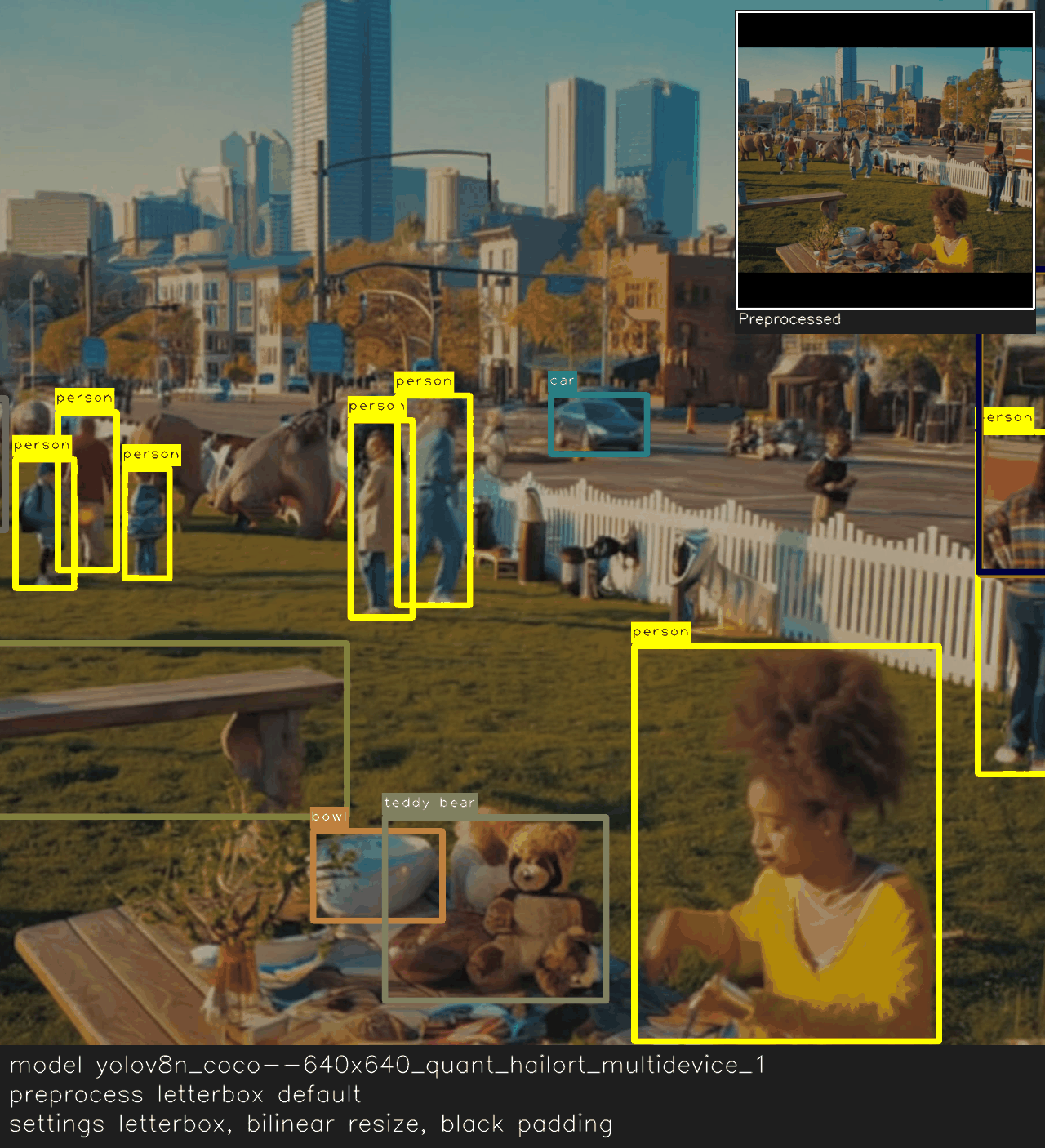
<figure><img src="https://1657109811-files.gitbook.io/~/files/v0/b/gitbook-x-prod.appspot.com/o/spaces%2FaQsuJ8iXkszyOgIpNy8w%2Fuploads%2Fgit-blob-63f927f3713832278a85721d932da76a0c4d1139%2Fhailo-cookbook--input-preprocessing--letterbox-default.png?alt=media" alt="Overlay and preview showing default letterbox preprocessing with black padding."><figcaption><p>Default letterbox preprocessing using bilinear resize with black padding.</p></figcaption></figure>
{% endtab %}

{% tab title="Letterbox neutral fill" %}

<figure><img src="https://1657109811-files.gitbook.io/~/files/v0/b/gitbook-x-prod.appspot.com/o/spaces%2FaQsuJ8iXkszyOgIpNy8w%2Fuploads%2Fgit-blob-a9a0cdf56eae2f2861520a70fa213ef2d42ffc41%2Fhailo-cookbook--input-preprocessing--letterbox-neutral-fill.png?alt=media" alt="Overlay and preview showing letterbox preprocessing with neutral gray padding."><figcaption><p>Letterbox preprocessing with a neutral 114,114,114 fill to soften the padding bars.</p></figcaption></figure>
{% endtab %}

{% tab title="Stretch to fit" %}

<figure><img src="https://1657109811-files.gitbook.io/~/files/v0/b/gitbook-x-prod.appspot.com/o/spaces%2FaQsuJ8iXkszyOgIpNy8w%2Fuploads%2Fgit-blob-76b525670f040b53fa91bf33bce1c2680e788026%2Fhailo-cookbook--input-preprocessing--stretch-fit.png?alt=media" alt="Overlay and preview showing stretched preprocessing that removes padding bars."><figcaption><p>Stretch preprocessing fills the frame without padding, trading aspect ratio for edge-to-edge coverage.</p></figcaption></figure>
{% endtab %}

{% tab title="Crop-first 0.75" %}

<figure><img src="https://1657109811-files.gitbook.io/~/files/v0/b/gitbook-x-prod.appspot.com/o/spaces%2FaQsuJ8iXkszyOgIpNy8w%2Fuploads%2Fgit-blob-e6a53075402182b558707dd3b082d052413f6ec1%2Fhailo-cookbook--input-preprocessing--crop-first-075.png?alt=media" alt="Overlay and preview showing crop-first preprocessing with crop percentage 0.75."><figcaption><p>Crop-first cuts to aspect ratio using a 0.75 crop percentage before resizing to the model input.</p></figcaption></figure>
{% endtab %}

{% tab title="Crop-last 0.60" %}

<figure><img src="https://1657109811-files.gitbook.io/~/files/v0/b/gitbook-x-prod.appspot.com/o/spaces%2FaQsuJ8iXkszyOgIpNy8w%2Fuploads%2Fgit-blob-d634d6756e883975086e0090eb946975804198f4%2Fhailo-cookbook--input-preprocessing--crop-last-060.png?alt=media" alt="Overlay and preview showing crop-last preprocessing with crop percentage 0.60."><figcaption><p>Crop-last upscales then center-crops with a 0.60 crop percentage, preserving edges after resizing.</p></figcaption></figure>
{% endtab %}

{% tab title="PIL backend" %}

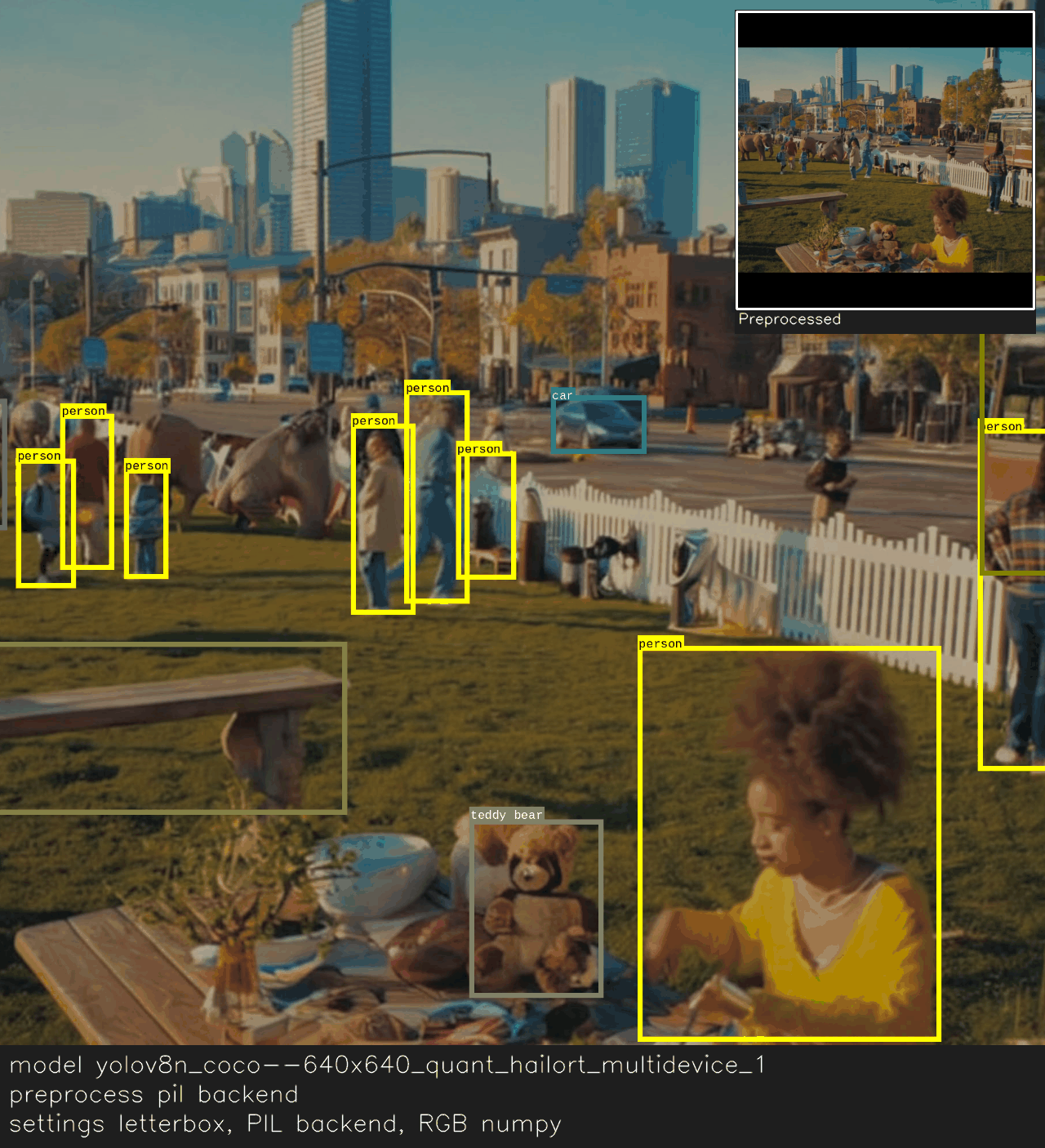
<figure><img src="https://1657109811-files.gitbook.io/~/files/v0/b/gitbook-x-prod.appspot.com/o/spaces%2FaQsuJ8iXkszyOgIpNy8w%2Fuploads%2Fgit-blob-b66531832998d3f9087310402159b75cabdb40bf%2Fhailo-cookbook--input-preprocessing--pil-backend.png?alt=media" alt="Overlay and preview showing letterbox preprocessing using the PIL backend with RGB colorspace."><figcaption><p>PIL backend processes frames in RGB before letterboxing, matching pipelines that load images via Pillow.</p></figcaption></figure>
{% endtab %}
{% endtabs %}

{% hint style="info" %}
Low‑level preprocessing (e.g., data type, quantization, normalization/scaling, etc.) is defined in the model JSON/package and cannot be changed at runtime. If you need different values, use a model built with those settings or a compatible variant.
{% endhint %}

### What the model expects (fixed values)

* `input_shape` **(often read‑only)**: Model’s fixed tensor dimensions (e.g., 640×640, 224×224). Hailo models are compiled for a specific shape.
* `input_image_format` **(RAW or JPEG)**: How frames may be transported/encoded into the runtime. Use JPEG to save bandwidth in cloud or AI Server setups.
* **Training alignment matters**: If training used centered crops or letterbox, match that here for best accuracy.

### Preprocessing options you can tune

{% stepper %}
{% step %}
`input_pad_method`: Fit strategy

Choose one strategy for mapping your source image into the model tensor:

* `"stretch"`: Resize directly to the model input, changing aspect ratio if needed.
  * *Use when bars are unacceptable and mild distortion is okay.*
* `"letterbox"` **(default)**: Resize preserving aspect ratio; fill side voids with `input_letterbox_fill_color`.
  * *Default fill is black `(0,0,0)`; many pipelines prefer a neutral gray like `(114,114,114)` to reduce contrast artifacts.*
* `"crop-first"`: Center‑crop first to the model’s aspect ratio using `input_crop_percentage`, then resize to final size.
  * **Example (square model, crop% = 0.875)**: 640×480 → crop to `min(640,480)*0.875=420` → 420×420 → resize → 224×224.
* `"crop-last"`: Resize with margin then center‑crop.
  * **Example (square model 224×224, crop% = 0.875)**: Set shorter side to `224/0.875=256` → keep aspect (e.g., 341×256) → crop to 224×224.
  * **Example (rectangular model 280×224)**: Resize to `(280/0.875=320, 224/0.875=256)` → crop to 280×224.

{% hint style="info" %}
**When to use which**:

* Classification‑style training usually uses `crop‑first` or `crop‑last` with crop ≈ 0.875.
* Detection/segmentation often uses `letterbox` to preserve aspect.
* Use `stretch` only if you know the model was trained that way or bars are unacceptable.
  {% endhint %}
  {% endstep %}

{% step %}
`input_resize_method`: Interpolation quality/speed

**Options**: `"bilinear"` (default), `"nearest"`, `"area"`, `"bicubic"`, `"lanczos"`.

* **Downscaling**: `"area"` or `"bilinear"` are typical; `"lanczos"` offers highest fidelity but is slower.
* **Upscaling**: `"bicubic"` or `"lanczos"` for quality; `"nearest"` is fastest but results in blocky output.
  {% endstep %}

{% step %}
`input_letterbox_fill_color`: Pad color for letterboxing

* **Default**: `(0,0,0)`; consider `(114,114,114)` for a more neutral look that reduces contrast artifacts.
  {% endstep %}

{% step %}
`input_crop_percentage`: How much of the original image is retained

* Used by `crop‑first` and `crop‑last`.
* **Typical values**: 0.80–0.95. For lower values, crop more before resizing.
  {% endstep %}

{% step %}
`input_numpy_colorspace`: Channel order for NumPy inputs (auto)

* **Auto behavior**: If `image_backend == 'opencv'` → BGR; if `image_backend == 'pil'` → RGB.
* **When to set manually**: Only if your NumPy array’s channel order doesn’t match the backend’s default.
  * **Example**: Using OpenCV backend but your frames are RGB → set `input_numpy_colorspace = 'RGB'`.
    {% endstep %}

{% step %}
`image_backend`: Preprocessing backend

* **Options**: `"opencv"` (default) or `"pil"`.
* **Impact**: Determines default colorspace (BGR vs RGB) and the library used for resizing and conversion.

{% hint style="info" %}
Pick the backend that matches how you already read frames to avoid unnecessary conversions.
{% endhint %}
{% endstep %}

{% step %}
`input_image_format`: Transport encoding

* **Options**: `"RAW"`, `"JPEG"`.
* **When JPEG helps**: In cloud or AI Server deployments to reduce transfer bandwidth.
* **Tradeoffs**: JPEG uses lossy compression (which may slightly affect accuracy); RAW maintains fidelity but uses more bandwidth.
  {% endstep %}
  {% endstepper %}

## Tips for choosing settings

* **Know the training policy?** Set the matching `input_pad_method` and a reasonable `input_resize_method`.
* **Don’t know?** Start with `letterbox` + `bilinear`, then test `crop‑first` (0.875) and `crop‑last` (0.875) on a small validation set.
* **Bars unacceptable?** Try `stretch`, but verify that accuracy remains acceptable.

## Common pitfalls to avoid

* Changing `input_shape` on Hailo models has no effect—the shape is compiled and fixed.
* A colorspace mismatch (e.g., RGB vs. BGR) may silently degrade accuracy. Make sure it matches your capture stack.

## Minimal inspection

Run this quick check to confirm the preprocessing settings applied by the model.

### Example

{% code overflow="wrap" %}

```python
from degirum_tools import ModelSpec, remote_assets

spec = ModelSpec(
    model_name="yolov8n_coco--640x640_quant_hailort_multidevice_1",
    zoo_url="degirum/hailo",
    inference_host_address="@local",
    model_properties={
        "device_type": ["HAILORT/HAILO8L", "HAILORT/HAILO8"],
    },
)
model = spec.load_model()
model(remote_assets.urban_picnic_elephants)

print("input size:", model.input_width, "x", model.input_height)
print("color order:", getattr(model, "preprocess_color_order", None))
print("mean:", getattr(model, "preprocess_mean", None))
print("std:", getattr(model, "preprocess_std", None))
print("convert:", getattr(model, "preprocess_convert", None))
```

{% endcode %}

Example output:

{% code overflow="wrap" %}

```bash
input size: 640 x 640
color order: BGR
mean: None
std: None
convert: None
```

{% endcode %}